Oct 1, 2026

How to create an SEO-friendly URL Structure
DraftSEO Team
A Google crawler budget study from the mid-2010s found that sites with flat, messy URL structures saw crawlers waste time on duplicate or low-value pages instead of indexing new content. For a site with thousands of pages, that's the difference between getting fresh articles indexed in hours versus weeks. Getting seo friendly links right from the start isn't cosmetic — it changes how fast and how fully your site gets crawled.
This matters whether you're fixing permalinks on a single WordPress blog or planning a URL architecture for an ecommerce catalog with 50,000 SKUs. The mechanics are the same; the stakes just scale up.
What Makes a URL "SEO Friendly" in the First Place
An SEO-friendly URL is short, descriptive, and predictable — a human can read it and guess what's on the page before clicking. Google's documentation confirms URL structure is a minor ranking signal on its own, but it directly affects crawl efficiency and click-through rate from search results.
The confusion starts when people treat URL structure as a ranking lever instead of what it actually is: a usability and crawl-efficiency signal. A clean URL doesn't outrank a messy one just for being clean. But a messy one can get skipped by crawlers, confuse users scanning search results, and create duplicate content when the same page is reachable through five different parameter combinations.
Lowercase, Hyphens, and Length
Use lowercase letters only — URLs are technically case-sensitive, so /Blog/Post and /blog/post can register as two separate pages to a server. Use hyphens to separate words, never underscores; Google treats a hyphen as a word break and an underscore as a joiner, so "seo-friendly-links" reads as three words while "seo_friendly_links" can read as one string.
Keep URLs under roughly 60 characters where practical. Shorter URLs display cleanly in search results and are easier to share without truncation, though there's no hard penalty at 75 or 100 characters — the real cost is readability, not ranking.
Building the Right URL Hierarchy and Folder Structure
A flat structure dumps every page straight under the root domain. A hierarchical structure groups pages into logical folders that mirror how your site's content relates. For most sites beyond a few dozen pages, hierarchy beats flat.
Why Flat Structures Fail at Scale
On a site with 10 pages, /best-running-shoes works fine next to /nutrition-tips. On a site with 10,000 pages, a flat structure gives crawlers no signal about which pages belong to which category, and it makes internal linking and breadcrumb navigation far harder to maintain. Crawlers rely partly on URL patterns to understand site structure, alongside internal links and sitemaps.
A Working Folder Pattern
A pattern like domain.com/category/subcategory/product-name gives both crawlers and users context at a glance. An ecommerce site selling shoes might use /shoes/running/brooks-ghost-16 rather than /product?id=48213. The folder path alone tells you it's a Brooks running shoe before you load the page.
Keywords, Stop Words, and Parameters: What to Cut
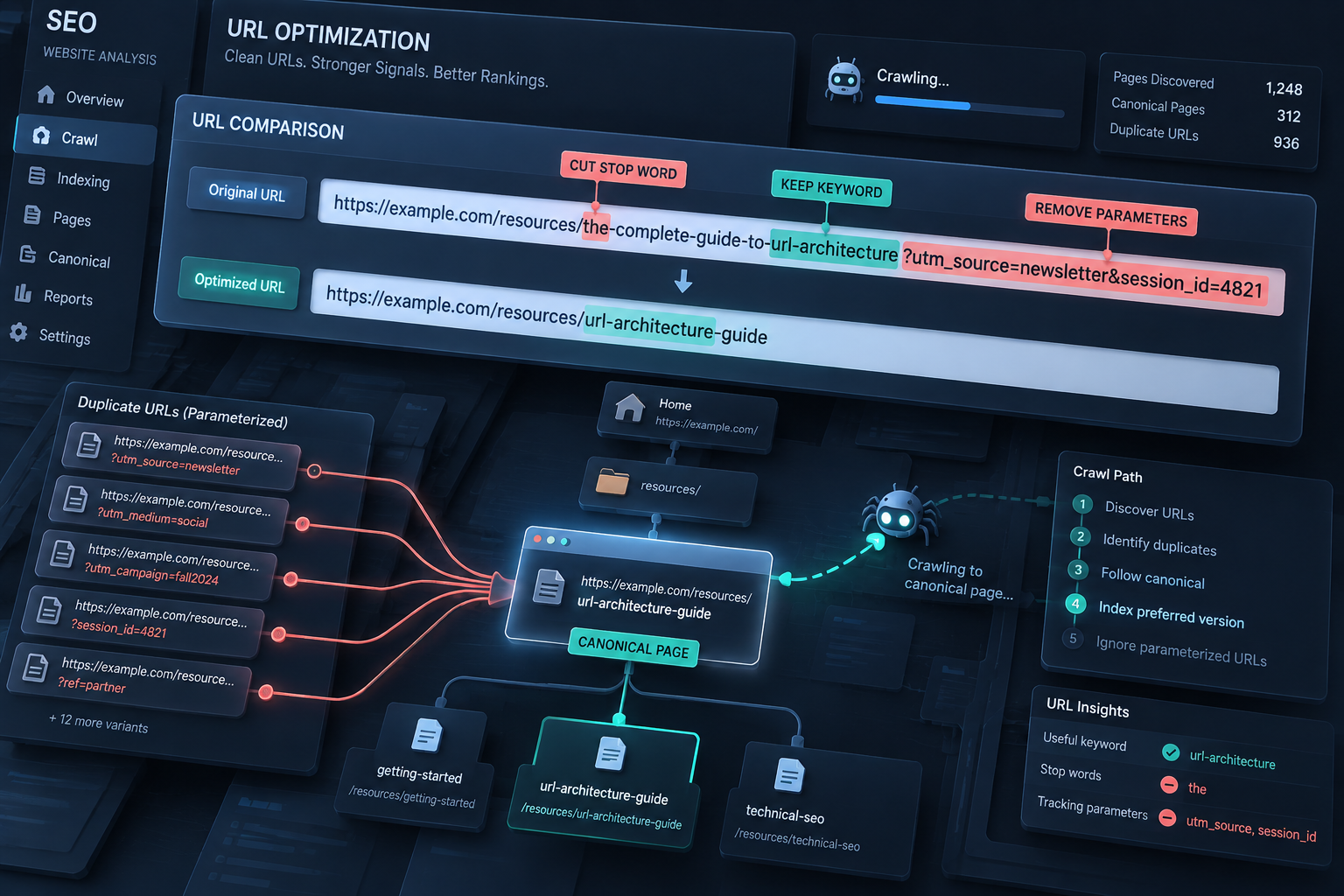
Put your target keyword once, early in the URL slug, and drop filler words. This is where most sites overcorrect in one direction or the other — either stuffing every related term into the slug or leaving default CMS-generated strings in place.
- Pick one clear phrase that describes the page — not three keyword variations strung together with hyphens.
- Remove stop words like "a," "the," "and," and "of" unless they're needed for readability (keep "for" in /gifts-for-dogs; it reads oddly without it).
- Strip tracking parameters like ?utm_source=newsletter from the canonical, indexable version of the URL.
- Avoid session IDs or dynamic parameters such as ?sid=93827 that generate a new "unique" URL per visitor session.
- Set a canonical tag on any page reachable through multiple URL variants, pointing to the one preferred version.
- Check your CMS doesn't auto-append category or date strings you don't want, like /2026/10/01/post-title.
Dynamic parameters are a common source of duplicate content: the same product page reachable via ?color=red, ?sort=price, and ?ref=email all look like separate pages to a crawler unless canonical tags sort out which one counts.
WordPress Permalinks and Automating URL Consistency
In WordPress, go to Settings > Permalinks and choose "Post name" rather than the default "Plain" setting, which produces ugly query-string URLs like ?p=123. Post name gives you domain.com/post-title automatically, which covers most of the hyphenation and lowercase rules without extra plugins.
For larger teams or agencies managing dozens of client sites, the harder problem isn't picking a permalink setting once — it's keeping URL formatting consistent across hundreds of articles published every month, especially when multiple writers or an automated pipeline are involved. Inconsistent slugs (one writer using underscores, another leaving stop words in) create cleanup work later. Platforms like DraftSEO.ai that generate and publish articles on a schedule can enforce the same slug formatting rules — lowercase, hyphenated, keyword-first — across every article automatically, which is worth checking against your own publishing plans on the DraftSEO.ai pricing page if you're producing content at volume.
Migrating URLs Without Losing Rankings
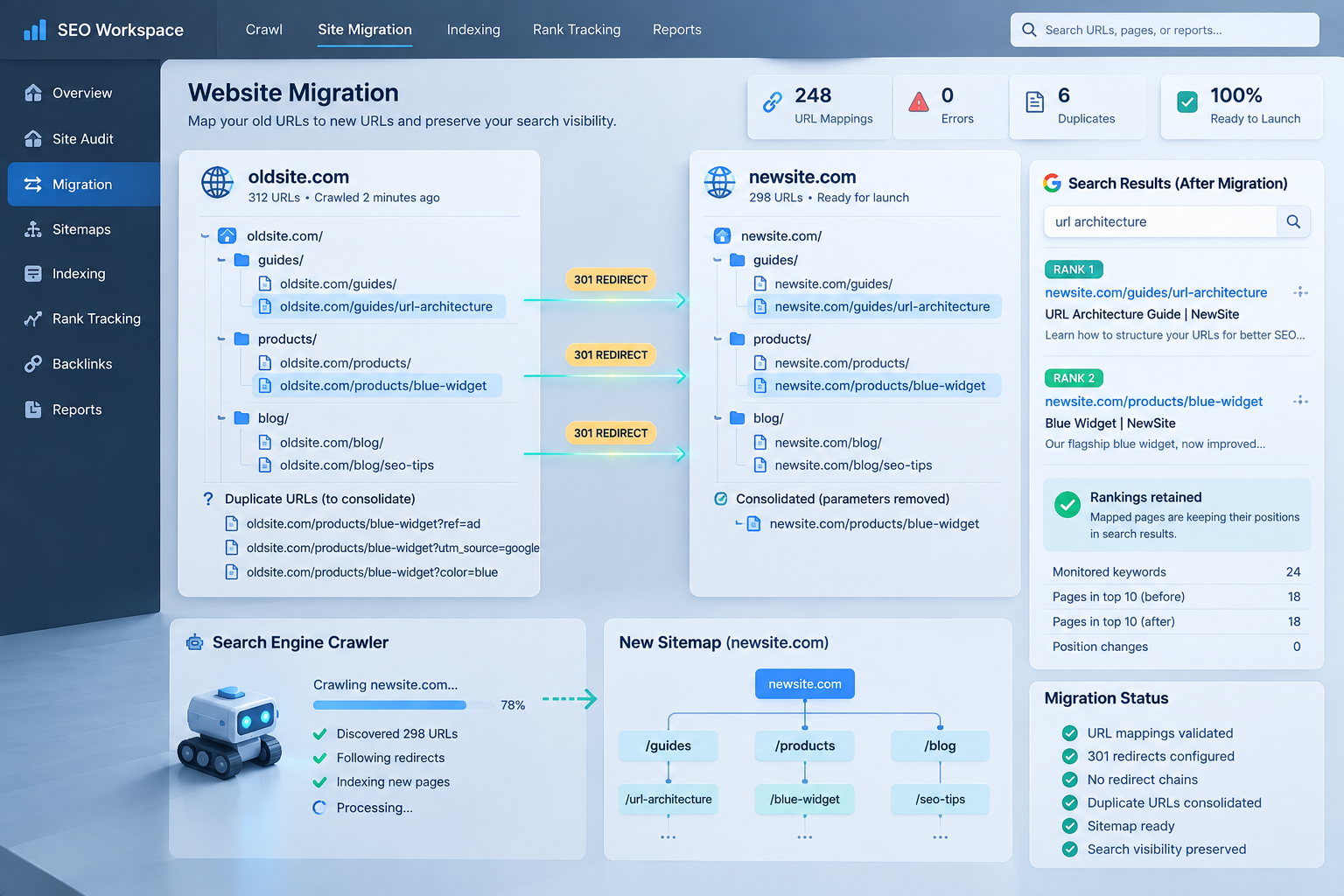
Changing URL structure on a live site is where most of the real damage happens, and it's rarely the structure itself that causes the drop — it's skipping the redirect step. Every old URL needs a 301 redirect to its new equivalent before the old one goes dark.
| Migration Step | Why It Matters |
|---|---|
| Map every old URL to its new URL | Prevents orphaned 301s or missed pages |
| Set up 301 (not 302) redirects | 301 passes link equity; 302 signals "temporary" and doesn't |
| Update internal links to new URLs | Reduces redirect chains that slow crawling |
| Resubmit updated XML sitemap | Speeds up re-crawling of new URLs |
| Monitor crawl stats for 404 spikes | Catches missed redirects within days, not months |
| Keep HTTPS and domain consistent | Avoids splitting authority across http/https or www/non-www versions |
A 302 redirect tells search engines the move is temporary and search engines may not pass full ranking value to the new URL — a mistake that's easy to make since many CMS plugins default to 302. For a site moving thousands of URLs at once, even a 1-2% redirect error rate means dozens of pages losing their accumulated authority. Run the migration in batches, verify each batch's redirects resolve correctly, and keep the old sitemap live alongside the new one for a few weeks so crawlers can process both.
Treat this as recurring maintenance, not a one-time project — sites that publish at scale need URL governance baked into their workflow, not patched after a migration goes wrong. If you're scaling up how much content you publish and want URL formatting handled consistently from the start, DraftSEO.ai's free trial is a low-cost way to test that before committing.
Frequently Asked Questions
Do URL keywords still matter for ranking in 2026?
Yes, but only as a minor signal. Google's algorithms focus far more on content quality and relevance; a keyword in the URL helps users and crawlers understand the page topic but won't rank a weak page on its own.
Should I use www or non-www, and does it affect SEO?
It doesn't affect ranking either way, but pick one and redirect the other to it permanently. Splitting traffic and links between both versions dilutes signals that should consolidate on a single, canonical domain.
How many URLs can I change at once during a migration?
There's no fixed limit, but batching by section (e.g., 500 product pages at a time) makes it easier to verify redirects and catch errors before they compound across the whole site.