Sep 13, 2026

Website Title vs Article Title: Which Ranks Better?
DraftSEO Team
Google's title tag pixel width caps out around 600 pixels on desktop, which is why titles past roughly 60 characters get cut off in search results with an ellipsis. That truncation point is exactly where most site owners lose ranking opportunity, because they treat the website title and the article title as if they were the same field. They aren't, and confusing the two costs keyword real estate on every single post you publish.
Website title vs article title comes down to scope: one names your brand site-wide, the other targets a specific search query on a specific page. Get that distinction wrong across 50 blog posts, and you've wasted 50 chances to rank for something new.
Website Title vs Article Title: What Each One Actually Controls
The website title is the name that appears in your site's global settings, usually pulled into every page's title tag as a suffix or prefix, like "| Acme Outdoor Gear." The article title (also called the post title or page title) is the headline specific to one piece of content, built to match what someone typed into Google for that exact page.
Where Each One Lives in Your Site
In WordPress, the website title usually comes from your SEO plugin's global title template, set once under something like Yoast SEO's Site Basics settings or Rank Math's global meta. The article title is set per post, either in the WordPress title field or overridden in the plugin's SEO title box on that individual page.
Why the Difference Matters for Rankings
Google indexes each URL separately. Your homepage title helps rank the homepage for brand searches and broad category terms. An article's title is what Google actually evaluates against long-tail queries like "best waterproof hiking boots under $150." The website title can't do that job for you — it's static, it doesn't shift per query, and stuffing it with keywords dilutes the one thing it's good at: brand recognition in the SERP.
Title Tag vs Meta Title vs H1: Untangling the Terminology
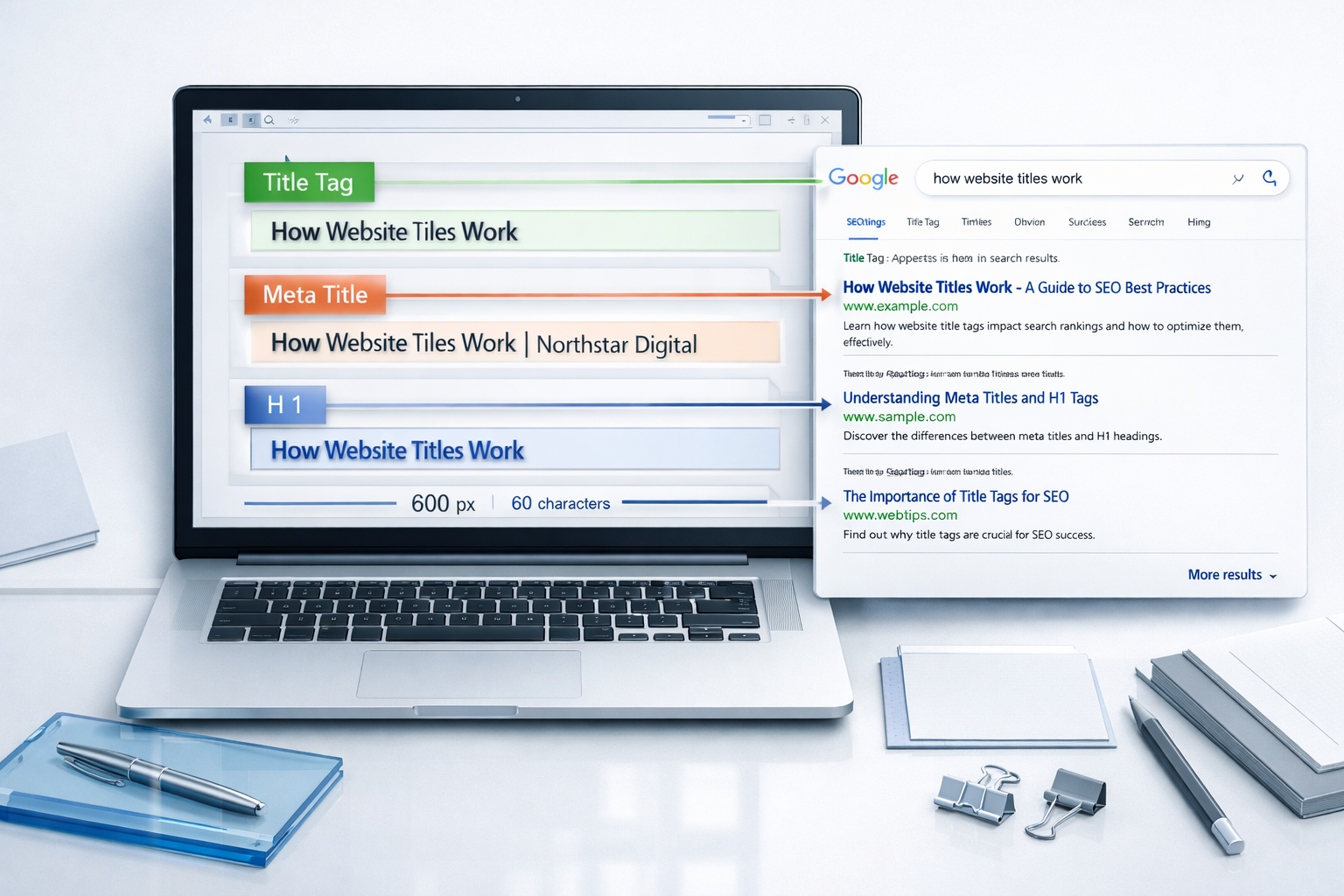
These three terms get used interchangeably, and that's the second biggest source of confusion after website title vs article title itself. The title tag is the HTML <title> element Google reads for SERP display. The meta title is the same thing under a different name, generated in your SEO plugin. The H1 is the visible headline on the page itself, and it doesn't have to match the title tag word for word.
A common technical SEO mistake is assuming the on-page H1 and the meta title are locked together. They aren't. Many CMS platforms, including WordPress with Yoast or Rank Math installed, let you write a punchy, curiosity-driven meta title for the SERP while keeping a clearer, more literal H1 on the page for readability and accessibility.
Character Limits That Actually Matter
Google renders roughly 50-60 characters before truncation on desktop, closer to 78 on mobile depending on device width, though pixel width (not character count) is the real constraint. As a working rule, keep meta titles under 60 characters and treat 70 as an absolute ceiling.
A Quick Terminology Table
| Term | What it is | Where it's set | Changes per page? |
|---|---|---|---|
| Website title | Brand name/site identity | Global SEO plugin settings | No |
| Article title | Page-specific headline for ranking | Per-post SEO title field | Yes |
| Title tag | HTML element Google reads | Plugin output (combines both) | Yes |
| H1 heading | Visible on-page headline | Post editor / theme template | Yes |
Why Reusing the Website Title Wastes Keyword Space at Scale
If you publish 20, 30, or 100 articles and every one carries "| YourBrand Name" tacked onto the end, you're spending 15-20 characters per title on something Google already knows from your domain and existing brand signals. That's real estate you could spend on a modifier like "2024," "for beginners," or a specific product name that matches search intent.
This is where the ranking impact compounds. One wasted title is a rounding error. Fifty wasted titles across a growing blog is a measurable drop in organic reach, because each article title is a separate ranking shot at a separate query, and you're spending part of it on redundant branding every time.
When Brand Name in Title Actually Helps
Branding earns its keep on the homepage, on your top category pages, and on any page targeting navigational searches like "Acme Outdoor Gear reviews." Beyond that, drop it or shrink it to a short suffix only when character space allows.
The Fix for Sites Publishing Regularly
Set your global title template to append the brand only on the homepage and top-level pages, not on every blog post. Most SEO plugins support conditional title templates for exactly this reason. If you're publishing regularly, writing distinct, keyword-matched titles for dozens of articles by hand gets tedious fast, which is part of why tools built for writing titles at scale, like DraftSEO.ai's article generation workflow, apply a consistent title structure automatically instead of leaving it to whoever wrote that week's post.
Common Mistakes That Quietly Hurt Click-Through Rate
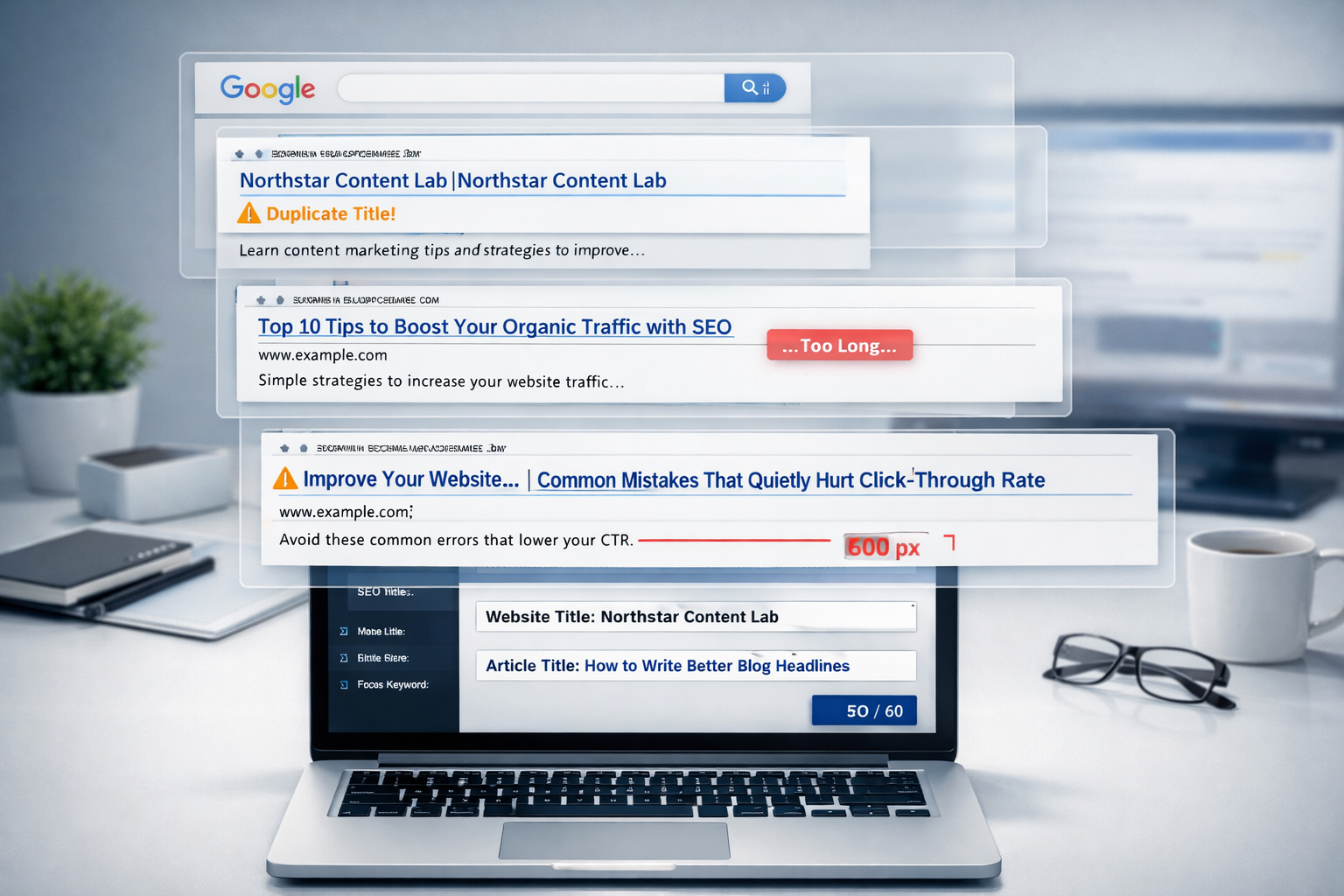
Click-through rate from the SERP is a signal Google watches, even indirectly, through user behavior patterns. A title that doesn't match intent or gets cut off mid-word loses clicks before the page ever gets a chance to rank on merit.
- Assuming the sitewide website title can rank for every article's target keyword instead of writing a fresh, specific title per page.
- Stuffing the brand name into every article title, burning characters that keywords should occupy.
- Confusing the meta title tag (what Google displays) with the visible H1 (what a visitor reads on the page).
- Believing a longer, keyword-packed title always outranks a shorter, clearer one — relevance and match to intent beats keyword density.
- Publishing titles once and never testing variations, missing easy click-through rate gains from a simple rewrite.
- Ignoring pixel-width truncation and letting the most important word in the title fall off the end.
Testing title variations doesn't require expensive tools. Change the title in Google Search Console's URL inspection preview, wait a few weeks, and watch whether impressions or click-through rate shifts for that query. Small wording changes, like swapping "Guide" for "Checklist," can move click-through rate meaningfully without touching rankings at all.
Publishing consistently is where most of this breaks down in practice, not because the concept is hard, but because writing 20 distinct, well-scoped titles a month is tedious when you're doing it manually alongside everything else on a content calendar. If you want to test whether automating optimized article publishing fits your workflow, DraftSEO.ai offers a free trial with starter credits, and its plans are listed on the DraftSEO.ai pricing page.
Frequently Asked Questions
Does the website title affect SEO rankings directly?
Yes, but only for the homepage and pages it's applied to, mainly for brand and navigational queries. It has no direct effect on how a specific blog post ranks for its own target keyword.
Should every article title include the brand name?
No. Reserve brand name for the homepage and top category pages. On individual articles, spend that character space on keywords and search-intent modifiers instead, unless you have room to spare under 60 characters.
What's the difference between an SEO title and the H1 on a page?
The SEO title (meta title) is what shows in Google's search results and can be written for clicks. The H1 is the on-page headline readers see and can use different wording for clarity or tone.