Nov 18, 2026

Keyword Research Tools for SEO: Compare Key Features
DraftSEO Team
You already know what a keyword is. What you need is a tool that fits how much research you do, what you can spend, and how the data reaches your publishing schedule.
The best keyword research tools for SEO differ less in their headline features than in their limits. These include daily lookups, export caps, database coverage, and how far a free account really goes. This comparison focuses on what each tool lets you discover, check, and export, and which tool suits a lean content site or a multi-client agency.
Why the numbers differ between tools
Put the same keyword into three tools and you'll get three volumes and three difficulty scores. That isn't a bug. Each provider builds its own model.
Search volume is an estimate
Search volume is a modeled monthly average. It varies by provider, location, and reporting period. Google Keyword Planner gives ranges unless you run active ads. Third-party tools mix clickstream data with their own crawling. Treat volume as a relative signal, not a count. A keyword showing 1,200 in one tool and 800 in another is "mid-volume" in both. Scale also matters: an Ahrefs study of its keyword database found that about 95% of keywords get 10 or fewer searches a month.
Difficulty and competition measure different things
Keyword Planner's "competition" column measures advertiser competition for paid ads, not how hard the keyword is to rank for organically. Keyword difficulty scores in Semrush, Ahrefs, Moz, or KWFinder use each provider's own formula, which is often weighted by backlinks to the top-ranking pages. Use the score to filter a list. Then open the actual results page before you commit. Forum threads or thin pages in the top five are a better signal than any score.
Keyword research tools compared

The table compares the tools most US site owners shortlist, as of November 2026. For what the paid plans cost, see our keyword research pricing comparison.
| Tool | Free access | Main strength | Main limit |
|---|---|---|---|
| Google Keyword Planner | Free with a Google Ads account | Google's own demand data, forecasts | Volume ranges; ad competition only |
| Google Search Console | Free for verified sites | Real queries, clicks, impressions for your site | Only shows queries you already appear for |
| Semrush | Limited free account, trial | Huge database, SERP features, keyword gap [1] | Daily request caps on free use |
| Ahrefs | Limited free tools | Competitor keywords, Content Gap | Full data needs a paid plan |
| SE Ranking | Trial | Large keyword database, 188 country databases, AI Overview tracking [2] | Fewer niche extras |
| Moz Keyword Explorer | Limited free searches [3] | Clean interface, priority scoring | Smaller free quota |
| KWFinder by Mangools | A few free searches a day [4] | Simple difficulty plus SERP view | Paid plans raise the daily lookup cap |
| Keyword Tool | Free suggestions [5] | Google Autocomplete long-tail ideas | Volumes require a paid plan |
| Keysearch | Limited free account | Budget-friendly difficulty checks | Smaller database |
Free tools, limited free accounts, and time-limited trials are three different things. A trial gives full access for a few days. A free account gives partial access with no end date. Plan your research around the right one.
Which tools fit your workflow
The right stack depends on your volume of research, not on feature lists.
Lean content and affiliate sites
Start with Google Search Console and Keyword Planner. Both are free, and Search Console shows queries you already get impressions for, often on page two. These are your fastest wins. Add one paid tool for difficulty and competitor research. KWFinder and Keysearch suit a site that researches a handful of articles a week, because their daily lookup caps are low but so is the price. Keyword Tool fills in long-tail and question variants. If you're unsure how many terms one page should target, see how many keywords to use for SEO.
Agencies with several clients
Agencies need wide country coverage, project folders, and bulk exports. Semrush, Ahrefs, and SE Ranking fit here. SE Ranking's 188 country databases help when clients sell outside the US [2]. Ahrefs' Site Explorer and Content Gap work well for client pitches. Budget per seat and per export, because limits on rows per report affect agencies sooner than features do.
From keyword research to scheduled publishing
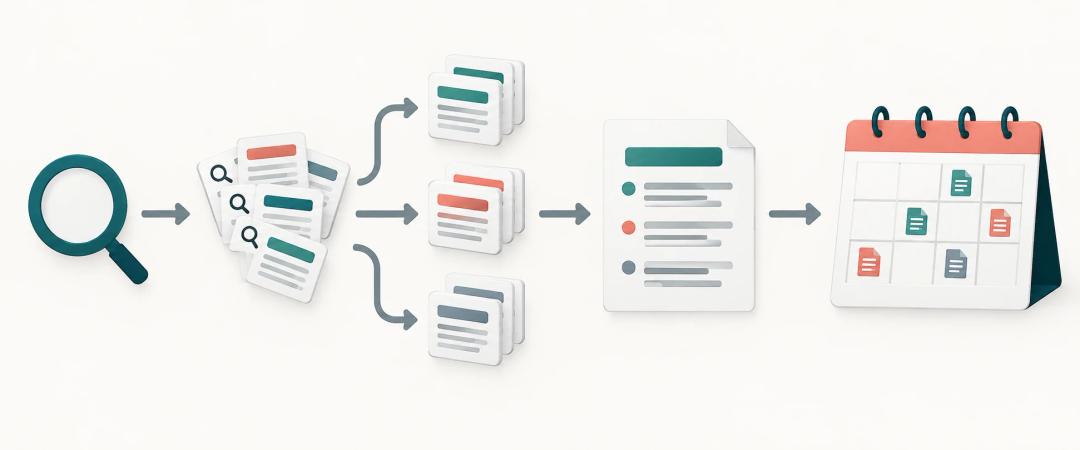
A keyword list is only useful once it becomes published pages. The handoff usually works in four steps:
- Cluster keywords by intent, so one cluster equals one page (a topical map makes this visible).
- Prioritize by winnability. A position-3 ranking on a 200-search term brings more clicks than position 40 on a 20,000-search term.
- Map head terms to pillar pages and long-tail variants to supporting posts that link back.
- Assign each page a publish date and track it in Search Console after indexing.
Step four is where most solo sites stall. DraftSEO handles scheduled publishing on autopilot. It researches keywords, writes the articles and publishes them to your site on a schedule: 30 articles a month per site for $39 a month. You can start for free and see how it fits with the tools you already use.
Frequently Asked Questions
What is the best free keyword research tool?
For most sites, Google Search Console paired with Google Keyword Planner is the best free setup. Search Console shows real queries for your site, and Keyword Planner adds new ideas and volume ranges. Keyword Tool adds long-tail suggestions from Autocomplete.
Is Google Keyword Planner free, and is it useful for SEO?
Yes, Google Keyword Planner is free with a Google Ads account, and you don't need to run ads. It's useful for discovery and seasonal trends. Its competition metric reflects advertiser bids, though, so judge organic difficulty separately.
Is Keysearch free to use?
Keysearch is mainly a paid tool with a limited free account that covers only a small number of searches. That allowance is enough to test difficulty scores on a few keywords. It isn't enough for regular weekly research.