Oct 20, 2026

Keyphrase in Subheading: SEO Placement Guide
DraftSEO Team
Yoast SEO's keyphrase in subheading check looks for your phrase in one or several of your H2 and H3 headings, not all of them. A 2-of-6 page (33%) still triggered a red dot for one user, so the check is stricter than the math suggests. Use the phrase where it describes the section, vary the wording elsewhere, and treat the light as a readability check, not a ranking rule.
How Many Subheadings Should Carry the Keyphrase?
Aim for one third to three quarters of your subheadings. On a post with six H2s, that means two to four headings. Yoast's guidance is to use the keyphrase in one or several subheadings, not every one, and to decide based on the paragraph under each heading.
How the Yoast check counts
The assessment reads the heading text itself, not markup or attributes. A heading counts when more than half of the words in your keyphrase appear in it. For a three-word keyphrase, two words are enough. That is why a natural variation can pass where a loosely related heading fails.
Why you might still see a red dot
Short posts with few headings are the usual cause. One match in two headings is 50%, but one in five is 20%, and that fails. A GitHub report for the classic editor showed a post with 2 of 6 matching (33%) and still getting a red dot, so the plugin's math doesn't always match the documented range. Add one natural match, or reword a heading, and recheck.
Good and Weak Subheadings Compared
The test for any heading is simple: does it describe the paragraph below it? If the keyphrase fits that description, use it. If it doesn't, leave it out. Forcing it in produces headings that satisfy a plugin and annoy readers.
Here is how that looks for a post about keyphrase in subheading:
| Heading | Verdict | Why |
|---|---|---|
| Keyphrase in Subheading: What Yoast Checks | Good | Exact match, describes the section |
| Where to Put Your Keyphrase in H2 and H3 Headings | Good | Partial match, over half the words appear |
| Keyphrase in Subheading Tips for Keyphrase in Subheading | Weak | Repeated phrase, reads as stuffing |
| Why Plugins Flag Short Posts | Good (no phrase) | Precise label for its paragraph |
| More Info | Weak | Says nothing to readers or crawlers |
When to leave the phrase out
Skip it in a heading about pricing, a caveat, or a related topic. A heading such as "Why Short Posts Fail the Check" tells the reader exactly what follows. Adding the keyphrase would make it vaguer, not clearer.
Variations and synonyms
Yoast matches words, not meaning, so a true synonym such as "heading" for "subheading" may not register. Use word-form variations instead ("subheadings with your keyphrase", "keyphrase in H2 headings"). Reserve synonyms for sections where the check doesn't matter.
Heading Structure Mistakes That Break the Check
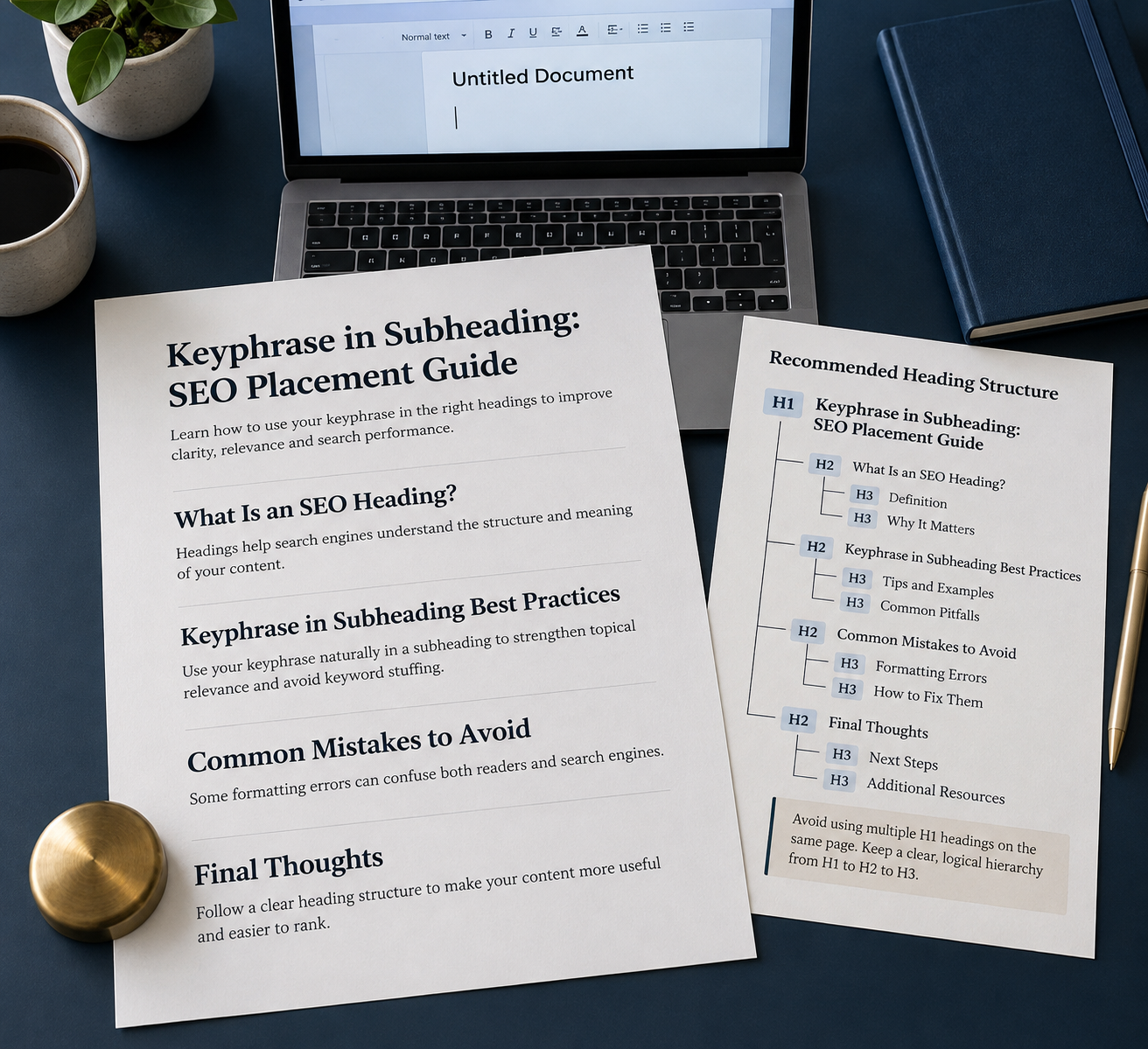
Many failed checks come from structure, not wording. Yoast and search engines read real heading tags, so bold text or a styled paragraph doesn't count as a subheading.
- Use one H1, which is your post title, and put your primary keyphrase in it.
- Use H2s for main sections and put the keyphrase or a close variation in some of them.
- Use H3s only under an H2, for sub-points. In WordPress, pick Heading 3 in the block editor, or "Heading 3" in the classic editor's Format dropdown.
- Never skip levels, such as H2 straight to H4. Screen readers and crawlers rely on the order.
- For a sub-subheading, use H4 under an H3, and only when the section is that deep.
- Keep headings short enough to scan.
Writing a heading hierarchy by hand on every post is slow. DraftSEO.ai builds the H2/H3 structure into each article it generates, so you review the headings instead of formatting them from scratch.
Does It Help Rankings and AI Answers?
Not directly. Documentation for the check says good subheadings with the keyphrase won't immediately raise rankings, but they help readers see what each part covers and break up a wall of text. Treat a green light as a guideline, not a guarantee.
The bigger payoff is retrieval. Answer engines and AI extractors use headings as entry points, so a heading that matches its paragraph lets them pull a clean passage. Put the direct answer in the first sentence or two under the heading.
A heading that says "Does Keyphrase in Subheading Affect Rankings?" followed by a plain answer is easy to quote. A stuffed one gives an extractor nothing to match. Secondary and related keywords belong in H3s and other H2s, where they describe supporting points, which keeps the primary phrase from being overused.
If you'd rather not format each post yourself, you can try DraftSEO.ai free on your first site, which includes 3 articles after setup.
Frequently Asked Questions
Should the keyphrase be in the H1 as well as subheadings?
Yes. Put your primary keyphrase in the H1 (the post title), then use it or a close variation in some H2s and H3s. Repeating the identical phrase in every heading reads as stuffing.
Do H2 and H3 headings both count?
Yes. Yoast recommends using the keyphrase in one or several subheadings, not every one. Use H3s for supporting variations under an H2.
Do synonyms count for the keyphrase in subheading check?
Mostly no. The check counts words from your keyphrase, and more than half must appear in the heading. Use word-form variations to pass the check, and synonyms where readability matters more.
References

[1] Keyphrase in Subheading: SEO and AEO Best Practices
[2] Header Tags & Keyword Placement Guide - Invoke Media
[4] How to use headings on your site
[5] Heading & Subheadings for Content Hierarchy and Style .
[6] Keyword Placement Tips - Digital Experience Hub
[7] Keyword Placement: Where Should You Put Keywords?
[8] Keyphrase in subheading incorrect (classic editor) #14521
[9] SEO for Blogs: Heading Hierarchy Rules That Drive Traffic