Sep 9, 2026

How to End a Blog Example for a Strong Close
DraftSEO Team
HubSpot has said blog posts with a clear closing call to action generate far more clicks than those without one, and yet most bloggers still write endings as an afterthought. The last 100 words of a post decide whether a reader bookmarks your site, clicks another link, or leaves and never comes back. Knowing how to end a blog example the right way means matching the closing style to what the reader actually came for, not bolting on a generic wrap-up.
That distinction is where most "how to write a conclusion" advice falls apart. A how-to post and an opinion piece need completely different endings, and treating them the same is why so many conclusions feel flat.
What Makes a Blog Ending Actually Work
A strong ending does two things: it adds one piece of new value, and it gives the reader something specific to do next. Neither part is optional. An ending that only restates the intro wastes the reader's time; an ending with no next step just stops.
The "new value" part is where most writers get lazy. Repeating the introduction almost word-for-word — swapping a few verbs — reads as filler, and readers notice. Instead, the closing paragraph should synthesize what the post proved, not just list what it covered. Think of it as the difference between a recap and a conclusion: a recap lists, a conclusion connects.
The "next step" part depends entirely on intent. A reader who searched "how to end a blog example" wants a technique to copy today, so the close should hand them a next action, like trying a specific closing formula on their next draft. A reader on an opinion piece wants to keep thinking, not act immediately.
Circling Back Without Repeating
Referencing the intro's hook, scenario, or question in the closing paragraph creates a sense of completion. If your intro opened with a statistic about bounce rate, your ending can return to that number and show how the advice changes it — without repeating the original sentence.
The Abrupt Ending Problem
Posts that end mid-thought, right after the last how-to step, leave readers stranded. Always add a short closing beat after your final instruction — even two sentences — so the post doesn't just trail off.
Conclusion Paragraph Structure That Holds Up Across Formats
A conclusion paragraph works best with three moving parts, in this order: a synthesis line, a value reminder, and a call to action. Skipping any one of the three is the most common reason closings feel thin or generic.
The synthesis line should state the single biggest takeaway in one sentence, not a bulleted recap. The value reminder connects that takeaway back to the reader's original problem — this is the "circling back" move without literal repetition. The CTA is the action you want them to take, matched to intent.
Here's a simple sequence to apply on your next draft:
- Write the synthesis sentence first, separate from the rest of the draft.
- Check it against your intro's hook — does it answer the same question?
- Add one sentence connecting the takeaway to the reader's likely next problem.
- Choose a CTA type that matches intent (informational, commercial, or opinion).
- Cut any sentence that just repeats an earlier heading.
- Read the ending out loud — if it sounds like a list, rewrite it as connected sentences.
- Keep the whole closing section under 100 words for most blog formats.
That word cap matters more than people think. A conclusion that runs 300 words dilutes the one point you actually want remembered, and readers skim past it.
Call to Action Examples by Blog Intent
The CTA is where intent-matching either pays off or falls apart. A commercial post can push a purchase decision hard; an opinion piece asking readers to "buy now" reads as tone-deaf and kills trust.
Informational and How-To Posts
These readers want to do something with what they learned. The strongest CTA is a next-step nudge: "Try this closing formula on your next three posts and track which one gets more comments." Specific, low-friction, and tied directly to the content above it.
Commercial and Product-Adjacent Posts
Here the CTA can be direct: a free trial, a demo link, a pricing page. If you're an ecommerce site owner ending a buying-guide post, a line like "Compare the three models above side by side before you check out" respects the reader's decision process instead of just shouting "Buy Now."
Opinion and Thought Pieces
These endings should provoke a question, not push a click. "What would change in your process if this assumption turned out to be wrong?" leaves the reader thinking, which is often the actual goal of the piece.
| Blog type | Ending goal | CTA example | Ideal closing length |
|---|---|---|---|
| How-to / informational | Give a next action | "Apply this to your next draft" | 60-90 words |
| Commercial / product | Move toward decision | "Compare options before you buy" | 40-70 words |
| Opinion / thought piece | Provoke reflection | "What would you do differently?" | 70-100 words |
| Listicle roundup | Reinforce best pick | "Start with option #2 if you're unsure" | 50-80 words |
Weak vs. Strong Endings, Side by Side
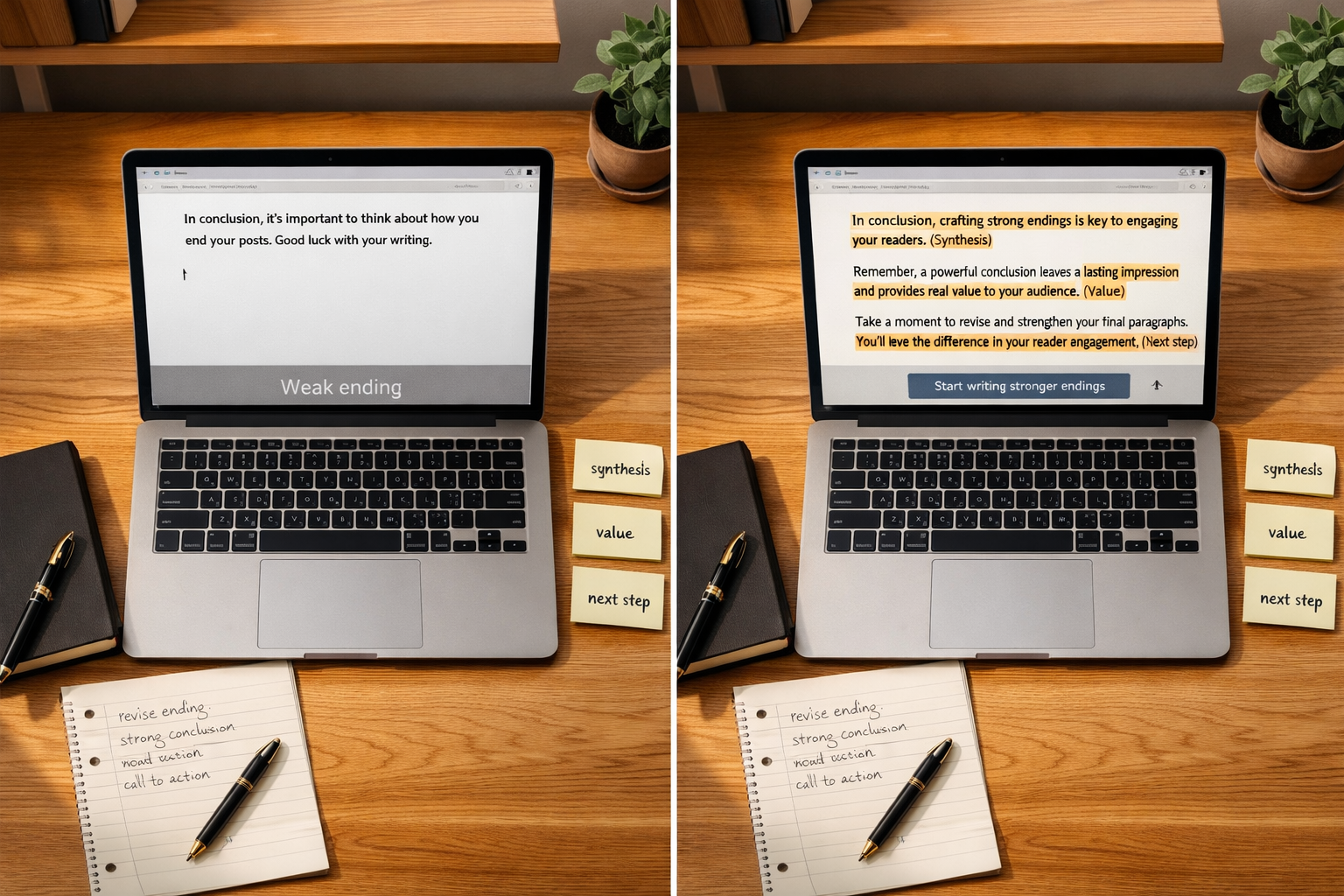
The gap between a weak and strong ending usually isn't creativity — it's specificity. Weak endings use vague verbs like "explore" or "consider"; strong endings name an action, a number, or a tool.
A weak ending: "As you can see, there are many ways to end a blog post effectively." That sentence tells the reader nothing new and asks nothing of them. It's the blog equivalent of trailing off.
A strong ending on the same topic: "Pick one closing formula from the table above and test it on your next two posts — then check which one holds readers longer before they bounce." Same topic, but now there's a specific next step and a way to measure it.
Tone consistency matters here too. If your post has been conversational and direct throughout, don't suddenly switch to formal corporate language in the last paragraph — readers feel that shift, even if they can't name it.
Maintaining that consistency gets harder the more you publish. A single writer can hold tone across ten posts; a team producing dozens a month often can't, and endings are usually the first thing that drifts — some get a CTA, some don't, some repeat the intro. Platforms like DraftSEO.ai build a consistent closing structure into every generated article, so tone and CTA placement don't vary post to post even at volume.
Scaling Consistent Closings Without Losing Quality

Publishing more content usually means closings get worse, not better, because the last paragraph is the first thing a rushed writer cuts corners on. The fix isn't writing longer conclusions — it's standardizing the structure so quality doesn't depend on how much time is left before deadline.
If you're producing content across a team or an agency roster, a documented ending template (synthesis, value reminder, intent-matched CTA) prevents the drift that happens when five different writers each guess at their own closing style.
For sites automating production entirely, this is one area worth checking before scaling output. DraftSEO.ai generates 30 articles a month for connected sites and integrates with popular CMS platforms for publishing, and its structure includes a consistent closing pattern across every article rather than leaving it to chance per draft. You can test that structure yourself through the free trial with starter credits listed on the DraftSEO.ai pricing page before committing to a monthly plan.
Frequently Asked Questions
How long should a blog conclusion be?
Most blog conclusions should run 60-100 words — enough for a synthesis line, a value reminder, and one CTA. Going past 150 words usually means you're repeating earlier sections instead of adding a final insight.
Should every blog post end with a call to action?
Not the same kind. Informational posts need a next-step nudge, commercial posts can push a direct decision, and opinion pieces do better ending on a question than a hard CTA — matching the ending to intent matters more than including one at all.
What's the biggest mistake writers make when ending a post?
Repeating the introduction almost word-for-word instead of adding new insight. It signals to readers that the piece has nothing left to say, which increases bounce right at the moment you want them to stay or click through.